
i-jingle webcaster1.2.1 - App Store
You'll be able to see results in few seconds.
Publisher Description
Because at this moment the help pages and videos for iJingle WebCaster are not yet available and because we did not want to wait any longer and launch the app anyhow, we decided to offer early buyers a special discount. Take advantage and download iJingle WebCaster now for only 19,99 (normal price 29,99).
iJingle WebCaster is the latest and greatest addition to the iJingle product family.
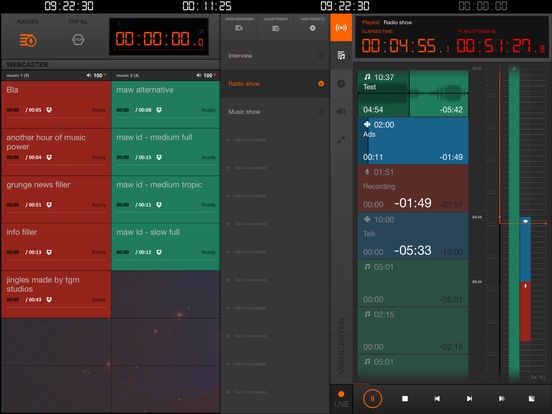
For this new App we've taken iJingle PRO as the basis and added extensive PLAYLIST and SHOW PLANNING capabilities, creating iJingle WebCaster, to be used by Broadcasters, Podcasters and Live Sound Engineers.
If you're On-air or engineer Live sound...
iJingle WebCaster is a soundboard style jingle player, great for any type of on-air or live situation. The extensive arranger and playlist creation features allow you to prepare parts of your show in advance or even create them on the fly. Select them from the preset bar and press play, pause or skip ahead.
If you're preparing a Show or Podcast...
iJingle WebCaster's Show Planning allows you to pre-plan your Show or Podcast in great detail. Use the arranger to set the total time for your show, add music items (jingle, fx and/or intro music) and non-music items (presentation, interview, etc.). When you're ready to record your show, just push play and off you go. The time line informs you about what's playing, what's coming and even shows you documents and websites you've linked to show items, right on the main screen.
If you're pre-recording a radio show or podcast...
iJingle WebCaster has voice-tracking. This means that you can create a complete show, right on your iPad. Plan your show by adding audio elements to the arranger and then record your voice on the segments you need. Easily edit your voice bits and tweak the arrangement and save the whole show as one file, ready to be distributed.
Requires iOS 8.0 or later. Compatible with iPad.
About i-jingle webcaster
The company that develops i-jingle webcaster is CamelWeb Creations SRL. The latest version released by its developer is 1.2.1.
To install i-jingle webcaster on your iOS device, just click the green Continue To App button above to start the installation process. The app is listed on our website since 2015-06-19 and was downloaded 0 times. We have already checked if the download link is safe, however for your own protection we recommend that you scan the downloaded app with your antivirus. Your antivirus may detect the i-jingle webcaster as malware if the download link is broken.
How to install i-jingle webcaster on your iOS device:
- Click on the Continue To App button on our website. This will redirect you to the App Store.
- Once the i-jingle webcaster is shown in the iTunes listing of your iOS device, you can start its download and installation. Tap on the GET button to the right of the app to start downloading it.
- If you are not logged-in the iOS appstore app, you'll be prompted for your your Apple ID and/or password.
- After i-jingle webcaster is downloaded, you'll see an INSTALL button to the right. Tap on it to start the actual installation of the iOS app.
- Once installation is finished you can tap on the OPEN button to start it. Its icon will also be added to your device home screen.
Program Details
System requirements
Download information
Pricing
Version History
version 1.2.1
posted on 2015-06-19
Disclaimer
Official App Store Link
We do not host i-jingle webcaster on our servers. We did not scan it for viruses, adware, spyware or other type of malware. This app is hosted by Apple and passed their terms and conditions to be listed there. We recommend caution when installing it.
The App Store link for i-jingle webcaster is provided to you by apps112.com without any warranties, representations or guarantees of any kind, so access it at your own risk.
If you have questions regarding this particular app contact the publisher directly. For questions about the functionalities of apps112.com contact us.
